
Guide · How to use Taxova
WhatsApp in. Filing-ready out.
Short path for businesses, then a full walkthrough of the CA dashboard — every panel, what to click, and how it fits month close and GST filing prep.
For businesses
Send invoices on WhatsApp. Your CA gets a clean file.
You do not need a new app. After onboarding, Taxova lives in the same WhatsApp chat you already use — snap a bill, send it, and move on.
-
1
Get started
Complete onboarding, confirm your WhatsApp number, and link your CA (or ask them to invite you via CA assign).
-
2
Send the invoice
Photo or PDF of the tax invoice is enough. Clear GSTIN, totals, and invoice number help your CA approve faster.
-
3
Taxova extracts & checks ITC
Fields are pulled automatically and ITC eligibility is flagged. Edge cases go to your CA’s review queue — not your inbox.
-
4
Your CA prepares the return
They review, close the month, and export GSTR drafts from the dashboard. Final filing still happens on gst.gov.in.
For CAs
CA dashboard — part-by-part guide
Every major area of /dashboard: what it is for, what you click, and how it fits WhatsApp → review → filing prep. Screenshots match the current Ledger UI (paper workspace, ink-navy sidebar, brass actions).
1. Big picture
Taxova prepares. Portal filing (GST) still happens on gst.gov.in.
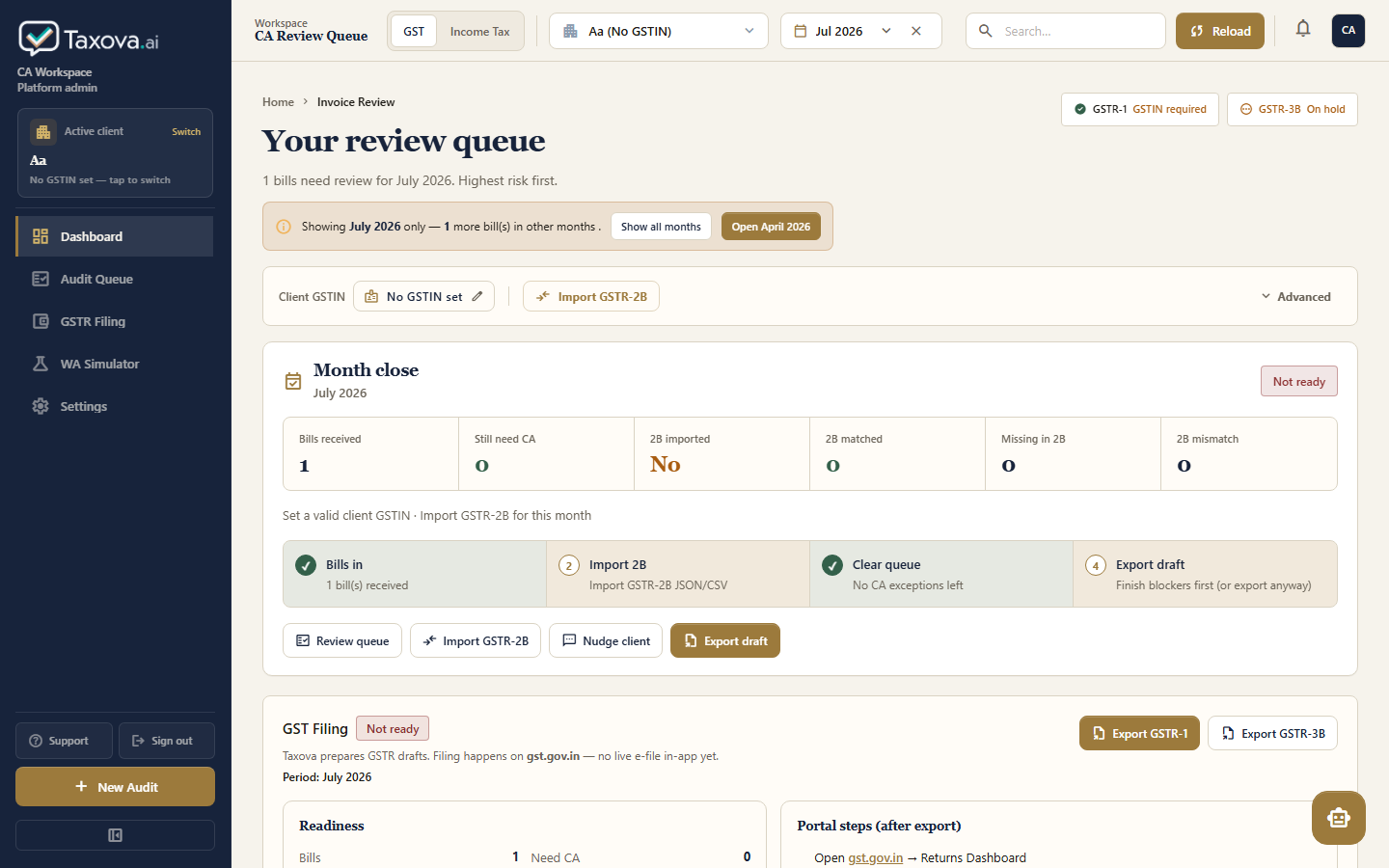
| Zone | What it is |
|---|---|
| A — Sidebar | Ink-navy nav + active client + New Audit + sign out |
| B — Top header | Menu (when sidebar hidden), GST / Income Tax, client, month, search, Reload |
| C — Main GST body | Review queue, GSTIN bar, month close, KPI strip, filing, pilot, invoice table |
2. Sidebar (left)
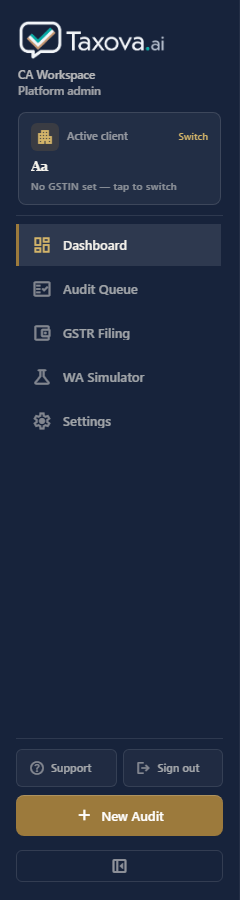
| Part | Purpose |
|---|---|
| Taxova.ai logo | Brand mark on the ink-navy rail |
| CA Workspace | Shows you are in the CA product (admin key may show platform/admin firm chip) |
| Active client card | Who you are reviewing. Switch focuses the client picker |
| Dashboard | Main GST review home |
| Audit Queue | Jumps to Needs review / invoice table |
| GSTR Filing | Focuses GST Filing panel (prep + export, not live e-file) |
| WA Simulator | Test WhatsApp uploads without Meta (local / staging) |
| Settings | CA login, API key, logout |
| Support | Shortcuts / help |
| Sign out | End CA session for this firm |
| Hide sidebar control | Fully hides the rail; use the header menu button to open it again |
| New Audit | Brass CTA — open next bill that needs review |
3. Top header

| Part | Purpose |
|---|---|
| Menu (sidebar open) | Appears when the sidebar is hidden — opens the rail again |
| Workspace · CA Review Queue | Context label (hides on narrower screens) |
| GST | Income Tax | Module switch. GST = invoices & filing prep. Income Tax = Form 16 / AIS / estimates |
| Client dropdown | Pick taxpayer (phone + name + GSTIN) |
| Month picker | Filter invoices / month-close / filing to one return period |
| Search | Filter invoice list by number / supplier / GSTIN |
| Reload | Brass primary — refresh invoices + metrics + pilot stats |
| Bell / CA chip | Notifications placeholder · session indicator |
4. GST module — review hero & context
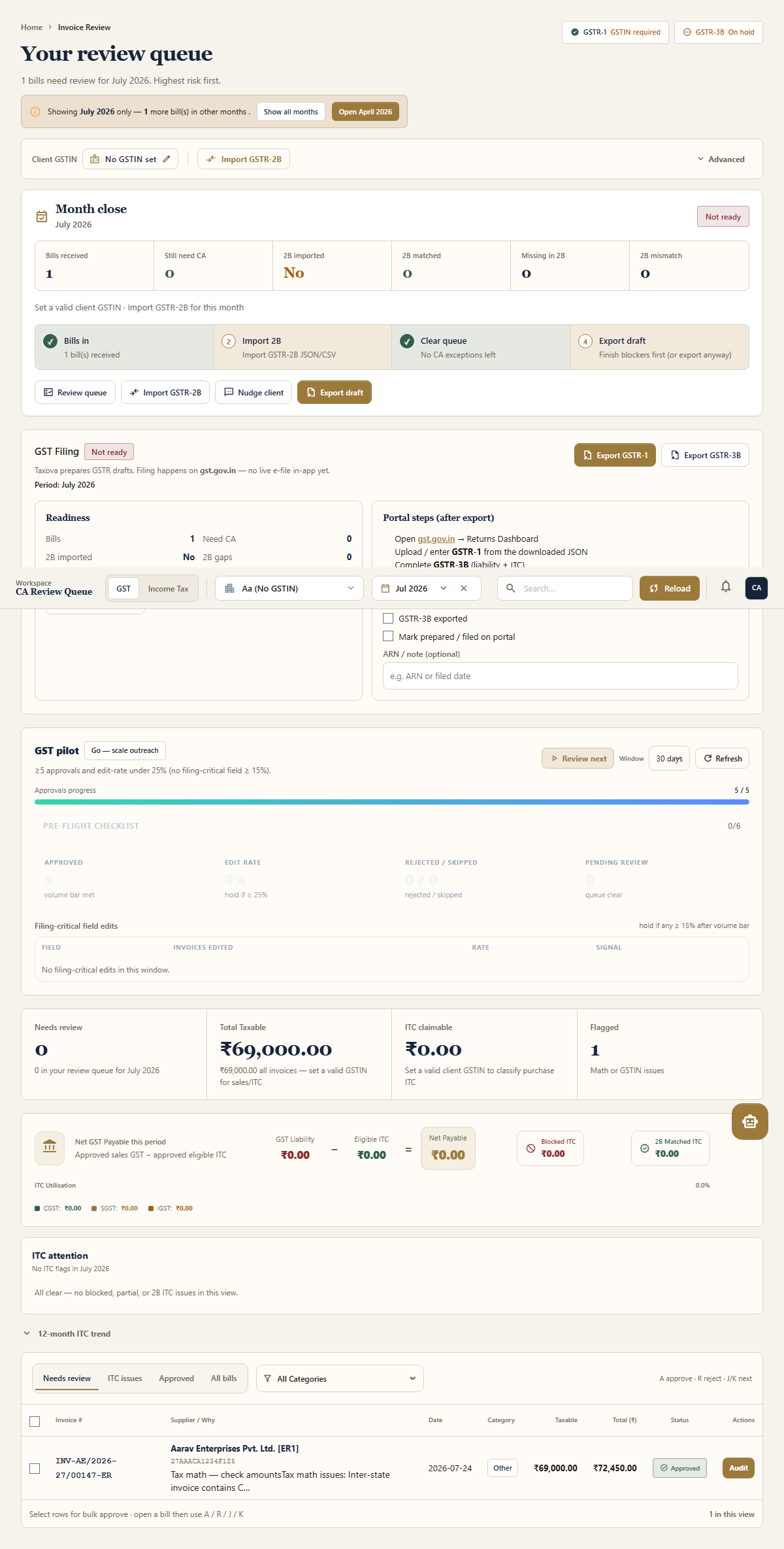
4.1 Page title row
| Part | Purpose |
|---|---|
| Your review queue | Home for CA exception review |
| GSTR-1 / GSTR-3B chips | Local readiness stamps (not portal filing status) |
| KPI strip | Needs review · Taxable value · ITC claimable · Flagged |
| Audit drawer | Paper slide-over to edit invoice fields, then Approve / Reject |
4.2 Client GSTIN bar
| Part | Purpose |
|---|---|
| Client GSTIN | Required for ITC classification and clean exports. Click to edit |
| Import GSTR-2B | Upload portal 2B JSON/CSV and reconcile purchases |
| Advanced | Pull 2B (OTP), recompute ITC, GSTIN lookup |
5. Month close
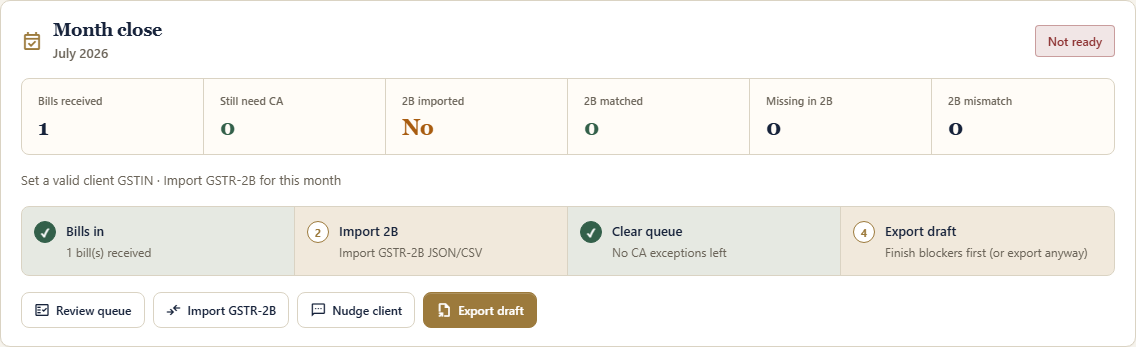
Purpose: answer “Can we close this return month?” before export.
| Part | Purpose |
|---|---|
| Period + Ready / Not ready | Selected month + blocker summary |
| Bills received | Count of invoices in this month |
| Still need CA | Exceptions still open |
| 2B imported / matched / missing / mismatch | Purchase reconcile health |
| Steps 1–4 | Bills in → Import 2B → Clear queue → Export draft |
| Review queue | Jump to Needs review |
| Import 2B | Open import modal |
| Nudge client | WhatsApp nudge for missing bills |
| Export draft | Open GSTR JSON export modal |
Common blockers: missing GSTIN, no month selected, bills still needing CA, 2B not imported.
6. GST Filing (Phase 1)
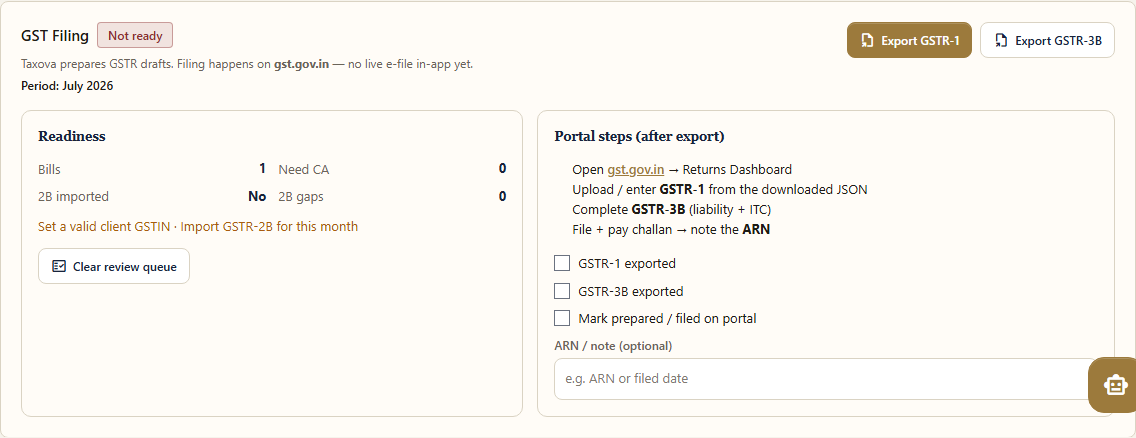
Purpose: turn “month is ready” into download drafts + portal checklist. Taxova does not submit to gst.gov.in yet.
| Part | Purpose |
|---|---|
| Ready / Not ready badge | Same readiness idea as month close |
| Export GSTR-1 / GSTR-3B | Download offline-utility-style JSON |
| Readiness stats | Bills, need CA, 2B imported, 2B gaps |
| Clear review queue | Fix blockers first |
| Portal steps | What to do on gst.gov.in after download |
| GSTR-1 / 3B exported checkboxes | Auto-tick after successful download (browser memory) |
| Mark prepared / ARN note | CA tracking only (local) — not a legal ARN |
7. GST pilot panel
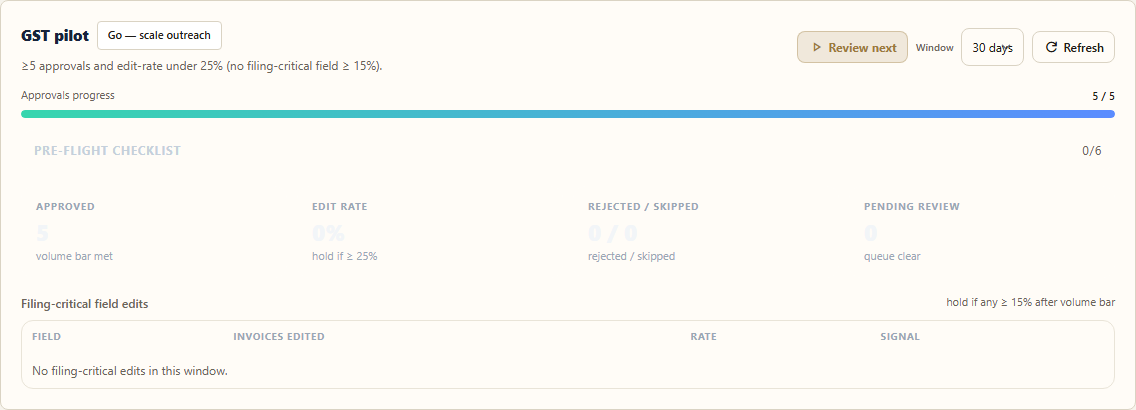
Purpose: founder / ops gate — “Is extraction good enough to scale?” — not day-to-day filing.
| Part | Purpose |
|---|---|
| Status pill | Collecting / check-in / Go / Hold |
| Approvals progress | Toward volume bar (default 25) |
| Review next | Open next firm-wide pending bill (easy ones first) |
| Edit rate | Locked until volume bar; then % of approved bills you edited |
| Rejected / skipped | Volume outside edit-rate |
| Pending review | Clickable → same as Review next |
| Pre-flight checklist | Day-zero / firm / training checklist |
| Filing-critical field table | GSTIN / totals / invoice # edits |
8. Invoice review table (queue)

| Part | Purpose |
|---|---|
| Tabs | Needs review / ITC issues / Approved / All bills |
| Row | One WhatsApp (or uploaded) invoice — hover shows brass edge |
| Risk / reason | Why it needs a CA (calc, GSTIN, 2B, ITC, etc.) |
| Audit / Approve | Open paper audit drawer or quick-approve when ready |
| Bulk bar | Multi-select approve |
Typical CA loop: Needs review → open bill → fix fields if needed → Approve → next.
9. Income Tax module
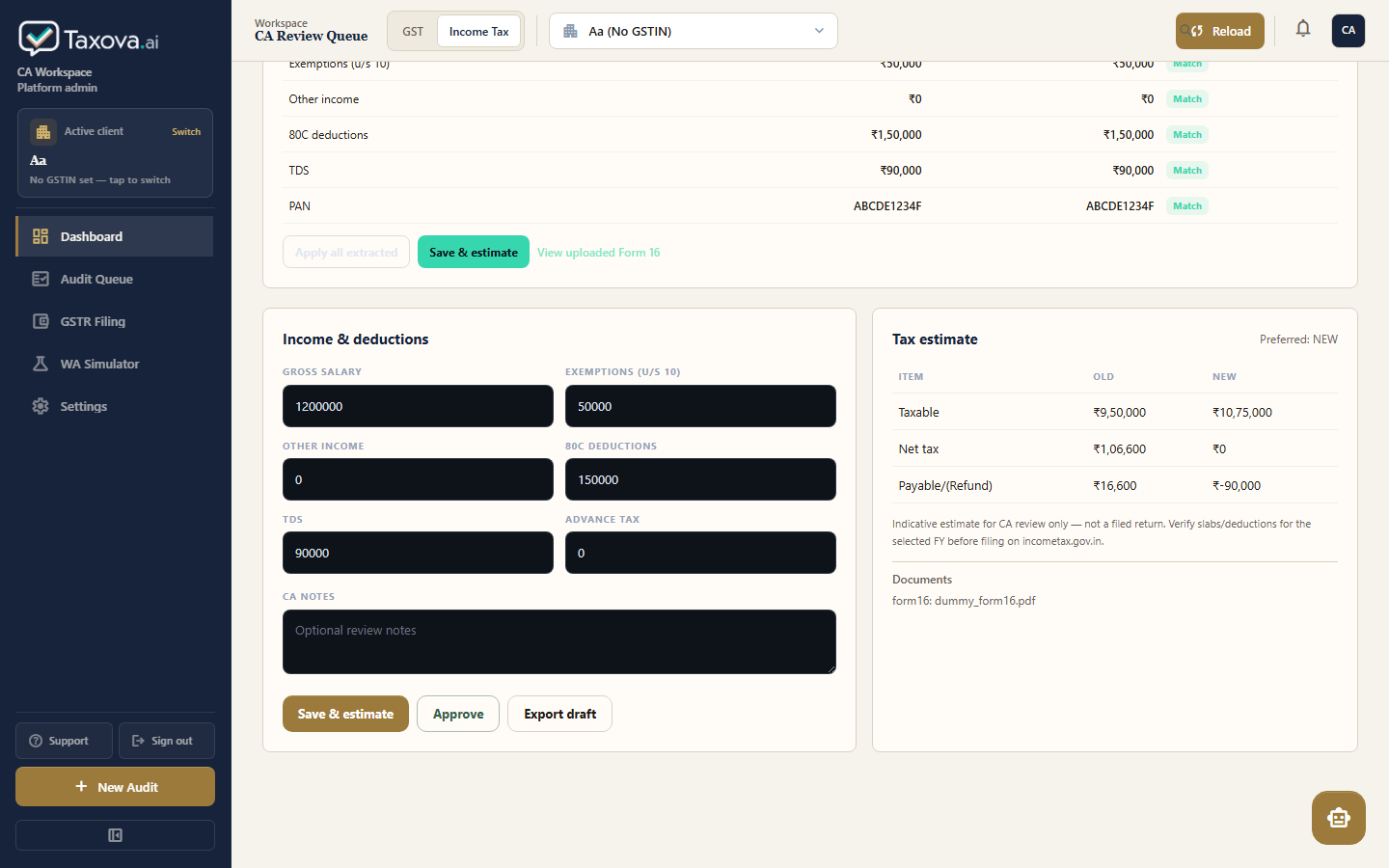
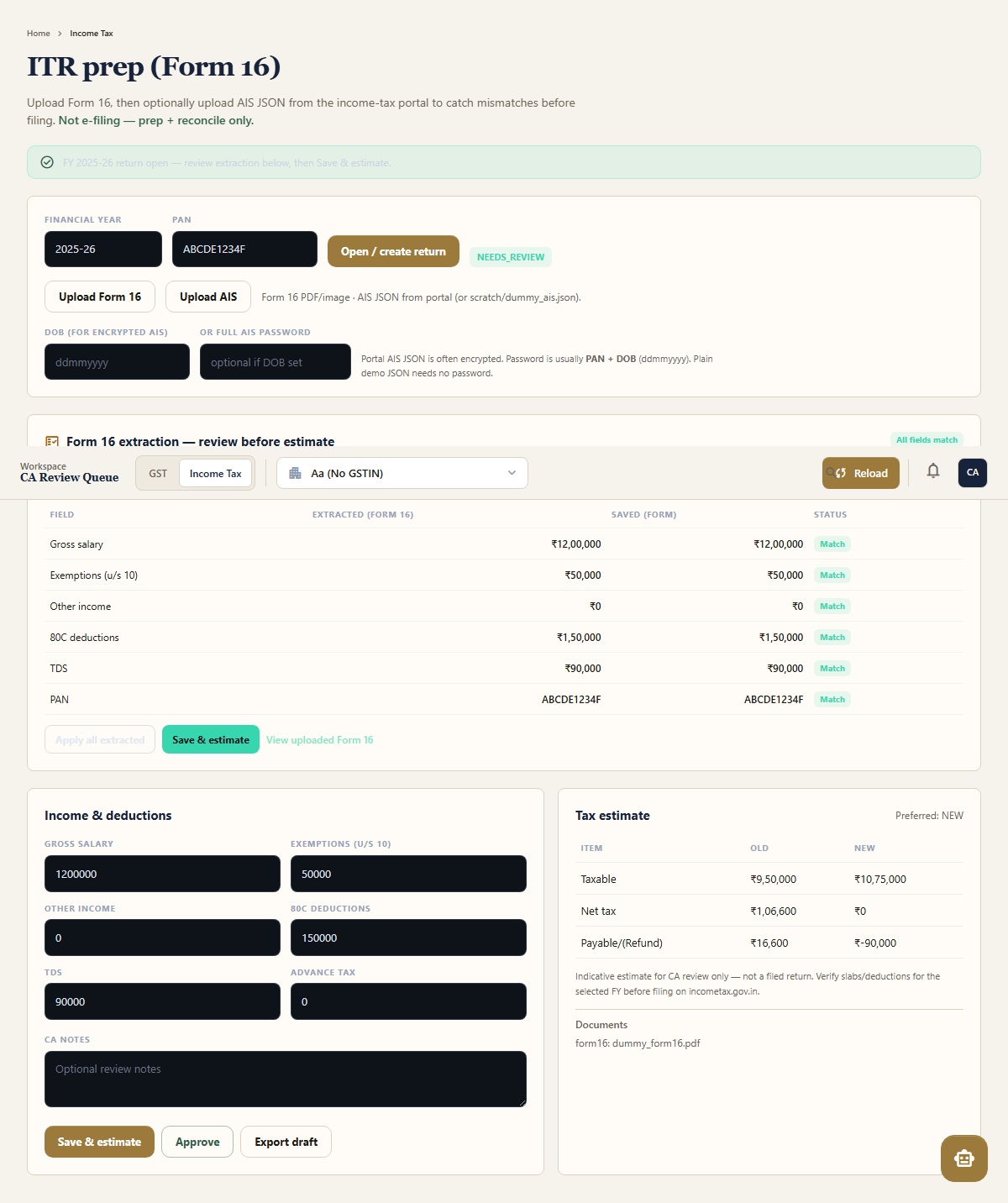
Switch with the header Income Tax tab (same client).
| Part | Purpose |
|---|---|
| FY + PAN + Open / create return | One ITR return per client + year |
| Upload Form 16 | PDF/image → AI extract salary / TDS / exemptions |
| Upload AIS | Portal/demo AIS JSON → reconcile vs Form 16 |
| Salary / TDS / 80C fields | Editable estimate inputs |
| Save estimate | Old vs new regime comparison |
| AIS vs Form 16 table | Mismatches (e.g. interest income) |
| Approve / Export draft | CA sign-off + prep for portal filing (not e-file inside Taxova) |
10. How the pieces connect (GST)
WhatsApp invoice → AI extract → lands in review queue.
CA edits if needed → Approve. Import GSTR-2B in parallel.
Month close ready → GST Filing → export JSON → file on gst.gov.in.
11. Login modes (why the UI looks empty)
| Mode | How | What you see |
|---|---|---|
| CA session | Settings → invite + password | Only clients linked via /ca-assign for that invite |
| Platform admin API key | Settings → paste dashboard API key | All clients in the DB (ops only — do not give to customer CAs) |